 IESCO
IESCO
Choose this page for an account that names Gujranwala Electric Power Company. Check the bill month before relying on the amount returned. The form sends your selected details to the provider’s billing page. This website does not create a bill or keep a copy of the result.
Start with the number on an earlier bill
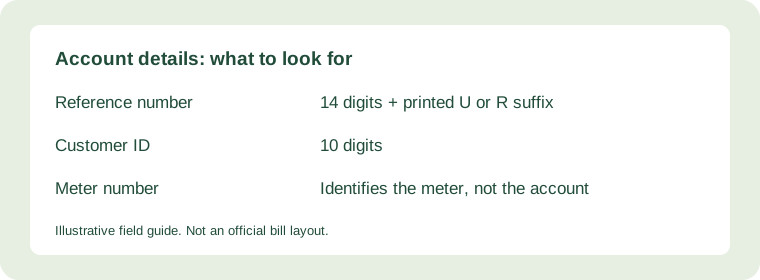
Choose Reference No for a 14 digit account reference, or Customer ID for the 10 digit option shown in this checker. Enter digits without spaces and keep any leading zero. Select U or R as it appears on the paper record.
After you press Submit, a new tab opens on the official service. Review the consumer details and month first. The destination decides whether a matching record is available and may ask for additional verification.
Practical help for Gujranwala customers
If a Gujranwala account shows an unexpected reading, identify the exact current and previous figures before contacting the subdivision. Keep the full bill for review.
Prepare a reading query with clear figures
Write down the current reading, previous reading and billing period shown on the record. Explain which figure looks wrong. Ask the company to review the reading instead of estimating a correction yourself.
Save the record you actually need
Use the result page’s print option, or your browser’s Print menu. Choose Save as PDF if your device offers it. Check that the amount, payment deadline and account details remain readable in the preview. See the download and print guide for device instructions.
When a result does not appear
Confirm the provider and number before trying again. Open the official GEPCO entry page directly if the new tab fails. Service availability and newly issued records remain under the provider’s control. Do not enter a banking password or OTP into this checker.
Questions before you submit
Will the result show a recent payment?
A transaction may take time to reach the billing record. Verify it through your bank or payment provider and keep the receipt.
Can this website retrieve every older month?
No. The official service controls available records. Keep monthly copies for your own history.
Where do I report an account problem?
Use the provider details on your printed bill or the official complaint system. Keep the acknowledgement and follow the instructions it gives you.
For the meaning of each charge, read how to read your electricity bill. For a failed lookup, use the troubleshooting guide and select the correct company above.
Review your GEPCO bill with confidence
Use this checklist when opening a record for Gujranwala Electric Power Company. Start with an earlier bill belonging to the same connection, then compare the returned consumer details before saving or paying. The checker opens the provider service; the guidance here helps you interpret and keep the record.
A monthly record worth keeping
Save a full copy with a filename containing the supplier, property and billing month. Keep the payment receipt alongside it. The bill explains the charge for the period, while the receipt records the transaction. Keeping both makes a later payment query easier to explain.
For a shared or rented property, agree who will save the record and confirm payment. Compare the service address each month, especially when a landlord manages several connections. Share only the information needed with the person responsible for the account.
Resolve a mismatch step by step
- Wrong address or consumer details: compare the entered identifier with the earlier paper bill before proceeding.
- Unexpected units: compare current and previous readings and the dates between them. Note the exact figure you want reviewed.
- Unexplained arrears: compare the previous balance with your payment receipt and transaction reference.
- Missing current month: check the official entry page again later and contact the supplier if you need the record urgently.
Keep a short written description of the issue, the relevant month and supporting documents. Use the supplier contact printed on the bill. Save any complaint acknowledgement so you can follow the same case through to a response.
More GEPCO bill questions
Where do I find my reference number?
Look for the labelled reference field on an earlier bill. Copy all 14 digits, including leading zeroes. The meter serial number identifies equipment and cannot replace the account reference. Our illustrated guide below shows the difference.
Should I choose Reference No or Customer ID?
Choose the option matching the field you have: 14 digits for a reference number or 10 digits for Customer ID in this checker. Changing the option clears the entry so that an old number is not submitted with the wrong search method.
How do I save a duplicate bill on my phone?
Open the official result and check the month and address. Use your browser menu to find Print or Share, then select a PDF destination if available. Review every page before saving; a cropped screenshot can leave out the due date or barcode.
What should I check before paying?
Match the consumer address and reference, then read the billing month, due date and payable amount. Check whether the displayed total is the amount before or after the deadline. Make the payment through your chosen bank or payment provider and retain its receipt.
Can I change an incorrect consumer name here?
This website cannot edit account records. Contact the supplier using the details on your bill and ask which documents are required for a name correction or ownership change. Submit documents only through the official process.
Why is my latest bill higher than the last one?
Compare the number of units and reading dates first. Then compare the tariff category, fixed charges, arrears and adjustment lines. A higher total does not by itself show a reading error. Ask the provider about the specific line you cannot explain.
Does a duplicate bill extend the due date?
Opening, printing or saving a duplicate does not change the deadline shown on the record. If you need an extension or a correction, ask the supplier what options apply to your account and obtain confirmation directly.
Can I use one number for several properties?
Use the account identifier belonging to each connection. Before paying or filing a copy, match the service address and meter details. Keep separate folders for different properties to avoid mixing bills and receipts.
Continue with the account number guide, printing instructions or bill fields guide for detailed help.