 IESCO
IESCOFind your electricity reference number
IESCOBillDesk · Reviewed 28 October 2026
Your reference number identifies the electricity account. Look in the consumer details area of an earlier bill. Use the 14 digits in the reference field, or choose the separate 10 digit Customer ID option.
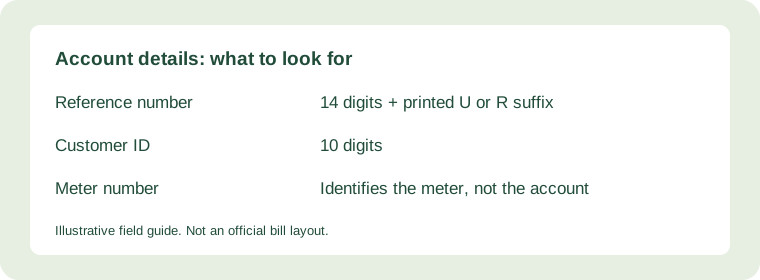
Copy the correct field
The meter number belongs to the physical meter. It is not the reference number. Check the label before typing. Keep any leading zero and enter digits without spaces. If the printed reference ends with U or R, select that suffix in the checker.
When your old number fails
Use the official reference search to look up an old or new reference. The electricity company controls this record. If you still cannot identify the account, contact the customer centre shown on your bill.
If you have no earlier bill
Ask the account holder or landlord for a copy. Confirm that the consumer name and service address match your connection. Do not post a complete bill on a public forum to ask for help. It can contain a name, address and account identifiers.
A name or CNIC alone is not a supported search method in our form. Official staff can explain which documents they need to confirm an account. Share those documents through their published channels only.
A reliable way to identify the account
Use a complete earlier bill, rather than an SMS containing only an amount. Start with the consumer name and service address so you know you have the right property. Locate the field labelled Reference No or Reference Number, then copy the digits in their printed order. Do not borrow a number from a neighbour: accounts in the same street still have different identifiers.
Example: keeping the leading zeroes
For illustration, a reference written as 00123456789012 contains fourteen digits. The first two zeroes are part of the entry. Typing 123456789012 changes the value and leaves only twelve digits. This example is a made-up number, not an account to look up. If you paste from a photo, compare every digit with the original because text recognition can confuse zero with the letter O.
Reference, Customer ID and meter number
These labels describe different things. A reference number and Customer ID identify the billing account through different search options. A meter serial number identifies the equipment installed at the property. Replacing a meter does not mean its serial number should be typed into the bill checker. Use the search option that matches the labelled account field you actually have.
If the bill belongs to a rented property
Ask the landlord or person responsible for the connection for a full recent copy. Match the address and, where available, meter details with your property before you rely on the result. If more than one portion shares a connection, the online record may cover the shared account rather than your private arrangement with the owner. Clarify that arrangement separately.
Frequently asked questions
Can I recover the number using only my phone number?
This checker cannot identify an account from a phone number, name, address or identity document. If an earlier bill is unavailable, ask the supplier which account-recovery process applies. Provide any requested proof through its own customer service process rather than posting documents publicly.
Can I enter spaces between the digits?
Enter digits without spaces. Compare the full value with the labelled reference field and keep leading zeroes.
What if my reference has changed?
Ask the supplier to confirm the current identifier for the connection. Match the returned address with your property before using the account.
Is the U or R part of the number?
In this checker, enter the digits in the number field and select the printed suffix separately.
Can I use a neighbour’s bill to find my account?
No. Each account has its own identifier. Obtain an earlier bill for your connection from the account holder or supplier.